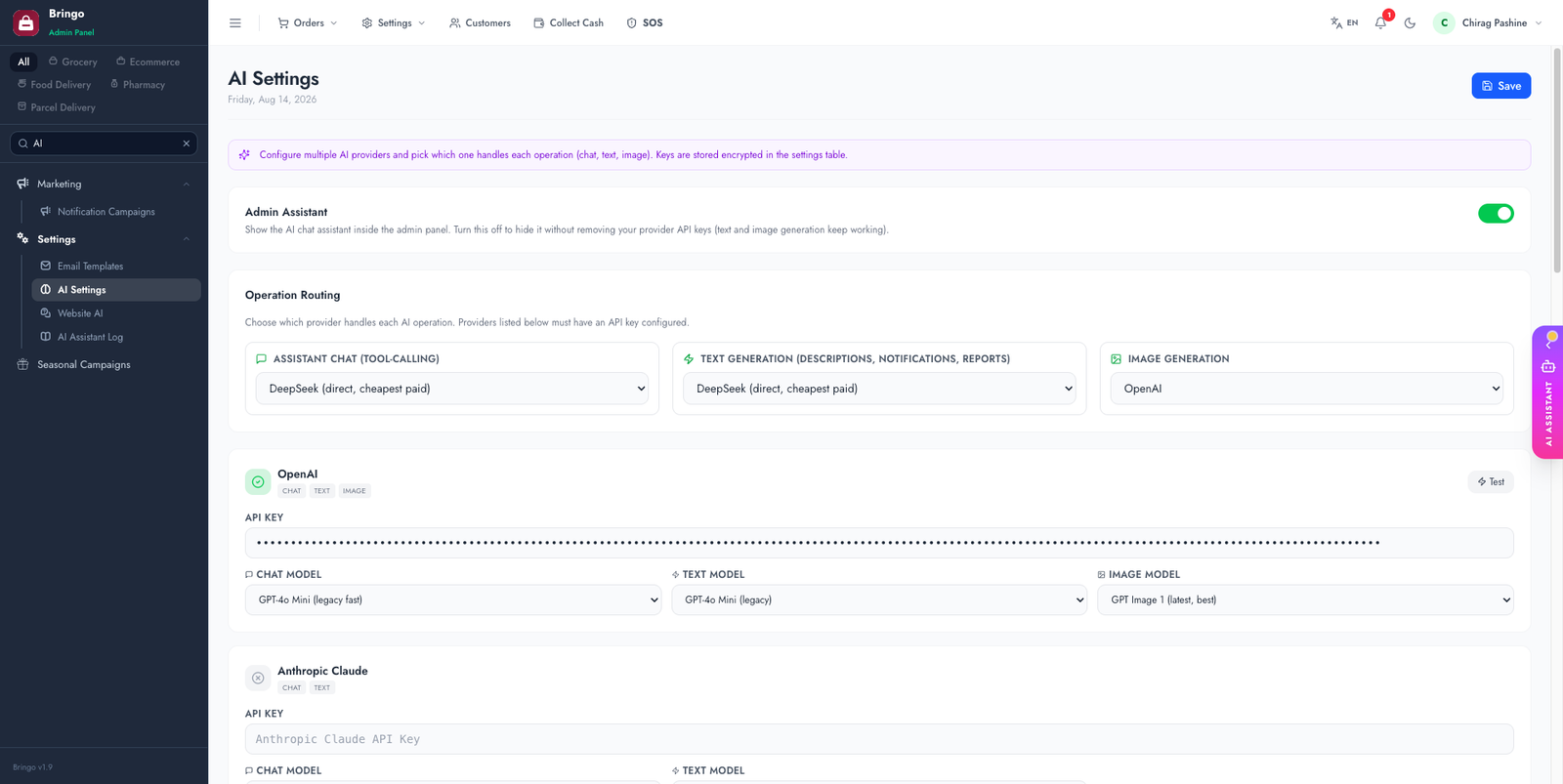
The platform has an optional AI layer that helps you (the admin) and your shoppers. Bring your own API key from any supported provider in Admin → AI Settings.
What the AI can do
Admin assistant — chat to query data, get order insights and summaries.
Content generation — write product descriptions and SEO content, generate product images.
Website assistant — a shopper-facing chatbot with a custom persona and avatar.
Auto-translate — translate admin/storefront strings (see Languages).
Supported providers
Pick whichever you have an account with — several offer free tiers:
Premium
OpenAI (GPT) · Anthropic (Claude) · Google (Gemini)
Aggregators
OpenRouter · Together AI
Fast / free tiers
Groq · Cerebras · DeepSeek · Mistral · xAI (Grok)
Setup
Get an API key from your chosen provider's dashboard.
Admin → AI Settings → paste the key next to that provider and press Test. A green response means the key and the selected model both work.
Route each operation to a provider (see below), then Save.
Keys are stored encrypted in the settings table, never in a file, and are never sent to the browser after saving.
Routing: three independent operations
The platform does not force one provider on everything. Each of these is routed separately, so you can put a fast, cheap model on chat and a stronger one on writing:
Assistant Chat (tool-calling)
Powers the admin assistant and the shopper chatbot. This one must support tool/function calling — it queries your data to answer. Groq and OpenAI are reliable choices.
Text Generation
Product descriptions, notification copy, report summaries. Quality matters more than latency here.
Image Generation
Product images. Only some providers offer this — OpenAI and Gemini are the usual picks; most "fast tier" providers do not generate images at all.
A provider only appears in a routing dropdown once it has a saved API key. Changing the provider for one operation never affects the other two.
Choosing a model
Each provider exposes its own model list in the panel. Two things worth knowing before you pick:
🧪
Always press Test after changing a model. Provider model catalogues drift: ids get retired, renamed, or listed publicly while returning 404 model not found for ordinary accounts. The Test button makes a real call, so it catches a dead id in two seconds instead of at the moment a customer uses the chatbot.
If a model fails, try the provider's current flagship id, or switch that one operation to another provider — the rest of the platform keeps working meanwhile.
Cost control
Start free
Groq, Gemini, DeepSeek and Mistral all have free or very cheap tiers that are fine for evaluating the feature.
Cap spending at the provider
Set a hard monthly limit in the provider's billing dashboard. The platform cannot cap provider spend for you.
Turn off what you do not use
The admin assistant and the shopper chatbot are separate switches. Image generation is by far the most expensive operation — leave it unrouted if you are not using it.
Chatbot rate limits
The website assistant has per-visitor and site-wide limits so a single visitor cannot burn your quota.
Admin → AI Settings.
Website assistant (optional)
Under Admin → AI Settings → Website, you can enable the shopper-facing assistant, give it a name, persona and avatar, and review past conversations.
💰
AI usage is billed by the provider per token/request. Start with a free-tier provider (Groq, Gemini) to evaluate, and set spending limits in the provider dashboard.
Troubleshooting
Test says "model not found" (404)
The model id is retired or not enabled for your account, even if the provider's docs still list it. Pick another model and Test again.
401 / invalid API key
Key copied with whitespace, revoked, or belongs to a different organisation. Regenerate it and paste again.
429 / quota exceeded
Free-tier limit or no billing on the account. Check the provider dashboard — this is billed by them, not by the platform.
Assistant answers generally but never cites your data
The chat operation is routed to a model without tool-calling support. Route chat to a tool-calling model.
Image generation silently does nothing
The routed provider has no image endpoint. Route the image operation to a provider that offers one.
Assistant hidden but you still want generation
The admin assistant has its own visibility toggle — turning it off does not disable text or image generation elsewhere in the panel.