Integrations
Payment Gateways
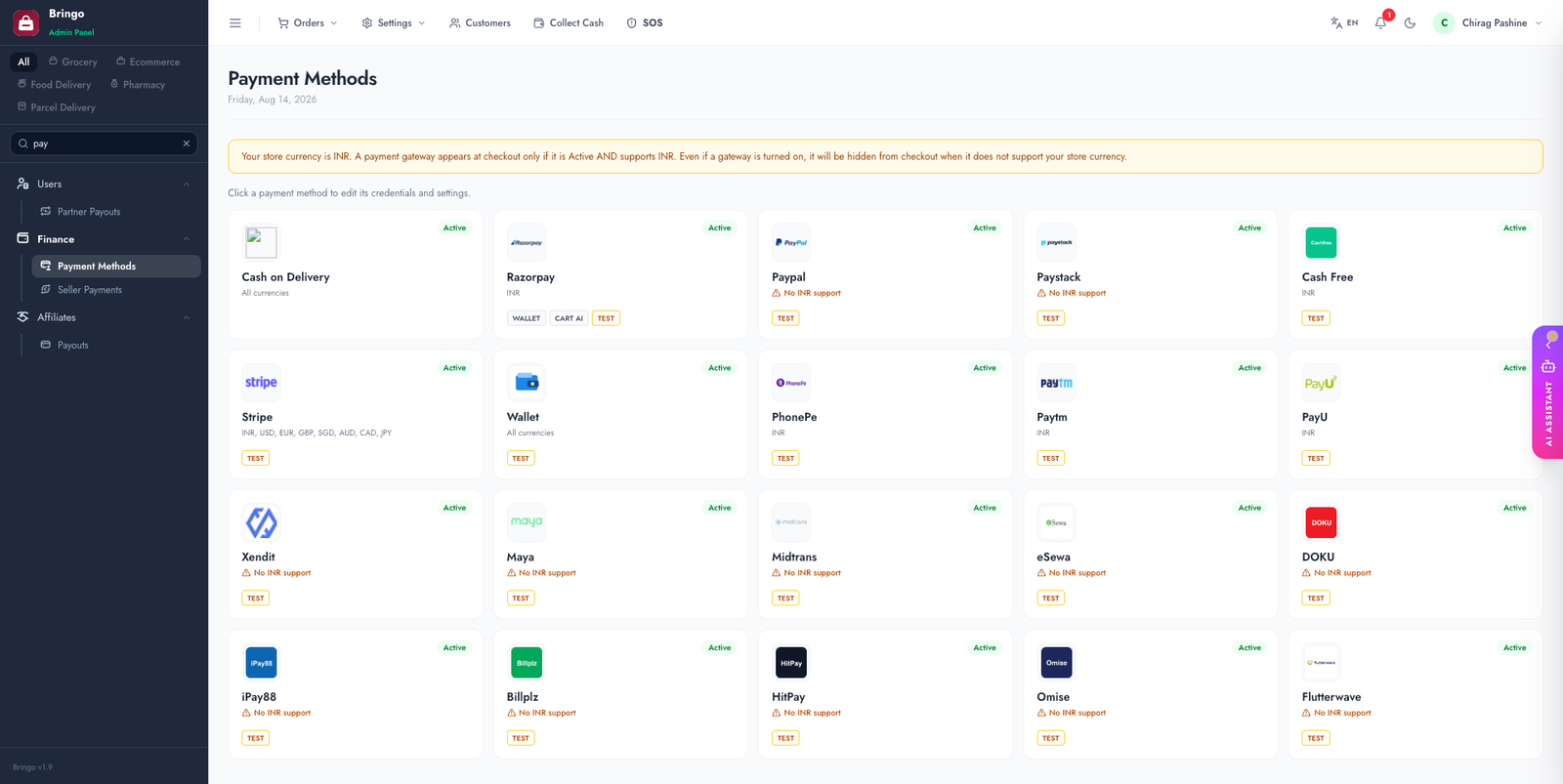
18 payment gateways ship with the platform, plus Cash on Delivery and Wallet payment. Everything is configured from Admin → Payment Methods — keys are stored in your database, never in source code. Every gateway arrives switched off with blank credentials; enable only the ones you need.
On this page
- Before you start — why a gateway may not appear at checkout
- General steps & key rules
- All gateways at a glance
- Setup by gateway — Global · India · South-East Asia · Nepal · Africa
- Cash on Delivery & Wallet
- Webhook & callback URLs
- Wallet top-up & AI cart payment
- POS payment methods
- Test cards · Troubleshooting
Before you start — why a gateway may not appear at checkout
A gateway is shown to customers only when both of these are true:
- It is Active in Admin → Payment Methods, with credentials saved.
- It supports your store currency — the currency of the active country in Admin → Settings → System Info. A gateway that doesn't support that currency is hidden even when it is switched on.
General steps
- Open Admin → Payment Methods.
- Pick a gateway and toggle it on.
- Paste the keys from your gateway dashboard (per-gateway sections below).
- Choose Test or Production and save.
- Register the webhook URL in the gateway dashboard, if that gateway needs one — the admin page prints the exact URL for you.
- Place a test order and confirm the order is marked paid end-to-end.
Rules that apply to every gateway
YOUR_ is treated as unconfigured and the gateway stays hidden at checkout.-/_/. only. Secret: max 256 characters.Three gateways are validated more strictly when you save:
rzp_test_… in Test mode and rzp_live_… in Production. Mixing them is rejected with an error.pk_test_ / pk_live_; the secret must start with sk_.All gateways at a glance
| Gateway | API Key field is… | Secret Key field is… | Extra fields | Webhook | Currencies |
|---|---|---|---|---|---|
| Cash on Delivery | — | — | — | — | Any |
| Razorpay | Key ID | Key Secret | — | — | INR |
| PayPal | Client ID | Client Secret | — | — | 25 major currencies |
| Paystack | Public Key (optional) | Secret Key | — | — | NGN GHS ZAR USD KES EGP CIV RWF |
| Cashfree | App ID | Secret Key | — | — | INR |
| Stripe | Publishable Key (optional) | Secret Key | Webhook Signing Secret | /api/webhooks/stripe | INR USD EUR GBP SGD AUD CAD JPY |
| Wallet | — | — | — | — | Any |
| PhonePe | Client ID | Client Secret | Merchant ID, Client Version | — | INR |
| Paytm | MID | Merchant Key | Website Name | callback URL | INR |
| PayU | Merchant Key | Salt | — | callback URL | INR |
| Xendit | not used | Secret API Key | Webhook Verification Token | /api/webhooks/xendit | IDR PHP USD |
| Maya | Public Key | Secret Key | — | /api/webhooks/maya | PHP |
| Midtrans | not used | Server Key | — | /api/webhooks/midtrans | IDR |
| eSewa | Product Code | Secret Key | — | — | NPR |
| DOKU | Client ID | Secret Key | — | /api/webhooks/doku | IDR |
| iPay88 | Merchant Code | Merchant Key | — | callback URL | MYR SGD IDR |
| Billplz | API Key | X-Signature Key | Collection ID | /api/webhooks/billplz | MYR |
| HitPay | not used | API Key | Webhook Salt (optional) | — | SGD MYR PHP |
| Omise | Public Key | Secret Key | — | — | THB JPY SGD |
| Flutterwave | Client ID | Client Secret | Encryption Key, Webhook Secret Hash | /api/webhooks/flutterwave | NGN GHS KES ZAR UGX USD |
PayPal's 25 supported currencies: AUD, BRL, CAD, CNY, CZK, DKK, EUR, HKD, HUF, ILS, JPY, MYR, MXN, TWD, NZD, NOK, PHP, PLN, GBP, RUB, SGD, SEK, CHF, THB, USD.
Setup — global gateways
Stripe
Dashboard → Developers → API keys.
pk_test_… / pk_live_…).sk_test_… / sk_live_…). This is what actually charges.sk_test_, Production with sk_live_.Stripe webhook (required)
Stripe confirms payments by calling your server — without it some payments never get marked paid.
- Stripe Dashboard → Developers → Webhooks → Add endpoint.
- Endpoint URL:
https://your-domain.com/api/webhooks/stripe - Select events — checkout session and payment intent, succeeded & failed.
- Copy the Signing secret (
whsec_…) into the Webhook Signing Secret box on the Stripe card in Admin → Payment Methods.
PayPal
developer.paypal.com → Apps & Credentials → create an app (Sandbox first, then Live).
api-m.sandbox.paypal.com, Production uses api-m.paypal.com.The buyer is redirected to PayPal and back automatically — no URL to register in the PayPal dashboard.
Setup — India
Razorpay
Dashboard → Settings → API Keys → Generate Key.
rzp_test_… for Test, rzp_live_… for Production.Razorpay also powers in-app checkout in the Customer app — no extra app configuration; the key is sent to the app at checkout time.
Cashfree
Cashfree merchant dashboard → Developers → API Keys.
x-client-id).x-client-secret).sandbox.cashfree.com, Production api.cashfree.com.PhonePe
PhonePe Business dashboard → developer/API credentials. This integration uses the OAuth (client id + secret) PG API.
M22XXXXXXXXXX.1 unless PhonePe tells you otherwise.Paytm
Paytm for Business → API Keys.
WEBSTAGING in Test, DEFAULT in Production (or the value Paytm assigned you).securegw-stage.paytm.in, Production securegw.paytm.in.Paytm posts the result back to /payment/paytm/callback on your domain (with matching wallet and parcel callbacks). These are sent with each transaction — nothing to register manually.
PayU
PayU dashboard → merchant key & salt.
test.payu.in, Production secure.payu.in.Results come back to /payment/payu/callback (plus wallet and parcel variants), sent with each request.
Setup — South-East Asia
Xendit
Xendit dashboard → Settings → API Keys (create a secret key with Money-in permissions).
https://your-domain.com/api/webhooks/xendit for invoice events.Maya (PayMaya)
Maya Manager → API keys (sandbox keys first, then production).
pg-sandbox.paymaya.com, Production pg.paymaya.com.https://your-domain.com/api/webhooks/mayaMidtrans
Midtrans dashboard → Settings → Access Keys.
app.sandbox.midtrans.com, Production app.midtrans.com.https://your-domain.com/api/webhooks/midtrans in Midtrans → Settings → Configuration. Notifications are signature-verified with your server key.DOKU
DOKU back office → integration / API credentials.
Client-Id).api-sandbox.doku.com, Production api.doku.com.https://your-domain.com/api/webhooks/dokuPayment links expire after 60 minutes by default. To change that, set a doku_payment_due_date setting (in minutes) in the settings table.
iPay88
iPay88 merchant portal → merchant code and key.
/payment/ipay88/callback plus wallet and parcel variants) are sent with every transaction. If your iPay88 account restricts return URLs, whitelist those paths with iPay88 support.Two optional settings-table keys fine-tune the checkout: ipay88_payment_id (force a specific payment method) and ipay88_lang (defaults to UTF-8).
Billplz
Billplz dashboard → Settings → API keys and Billing → Collections.
billplz-sandbox.com, Production billplz.com.https://your-domain.com/api/webhooks/billplzHitPay
HitPay dashboard → Settings → Payment Gateway → API keys.
api.sandbox.hit-pay.com, Production api.hit-pay.com.The customer is redirected to HitPay and back; the payment is then verified server-side, so no webhook registration is strictly required.
Omise
Omise dashboard → Keys.
Setup — Nepal
eSewa
eSewa merchant onboarding provides a product code and secret.
EPAYTEST in the sandbox.rc-epay.esewa.com.np, Production epay.esewa.com.np.Success and failure return URLs are submitted with the payment form — nothing to register.
Setup — Africa
Paystack
Dashboard → Settings → API Keys & Webhooks.
sk_…). This is what initialises and verifies transactions.The callback URL is sent with each transaction, so no dashboard configuration is needed.
Flutterwave
Uses the Flutterwave v4 API. Dashboard → Settings → API.
verif-hash header).https://your-domain.com/api/webhooks/flutterwaveCash on Delivery & Wallet
Webhook & callback URLs
Replace your-domain.com with your live domain. The admin page prints these for you on the relevant gateway cards.
| Gateway | URL to register in the gateway dashboard |
|---|---|
| Stripe | /api/webhooks/stripe |
| Midtrans | /api/webhooks/midtrans |
| Xendit | /api/webhooks/xendit |
| DOKU | /api/webhooks/doku |
| Billplz | /api/webhooks/billplz |
| Maya | /api/webhooks/maya |
| Flutterwave | /api/webhooks/flutterwave |
PayU, Paytm and iPay88 post their result to callbacks that the platform submits with each transaction — you don't register them, but they must be reachable over HTTPS:
| Gateway | Order | Wallet top-up | Parcel |
|---|---|---|---|
| PayU | /payment/payu/callback | /wallet/payment/payu/callback | /parcel/payment/payu/callback |
| Paytm | /payment/paytm/callback | /wallet/payment/paytm/callback | /parcel/payment/paytm/callback |
| iPay88 | /payment/ipay88/callback | /wallet/payment/ipay88/callback | /parcel/payment/ipay88/callback |
Wallet top-up & AI cart payment
Two toggles on each gateway card decide where else that gateway can be used:
POS payment methods
In-store POS sales don't use the gateways above — they record a tender type from a separate list: Cash, Card, UPI and Net Banking.
pos_payment_method database table if you need different tenders. Always keep a row whose name contains "cash": the Seller app's cash-reconciliation report finds it by name.Test cards
4242 4242 4242 4242, any future date, any CVC.Troubleshooting
YOUR_…), or it doesn't support your store currency. Check the currency banner at the top of Admin → Payment Methods.pk_ key goes in API Key, the sk_ key in Secret Key.